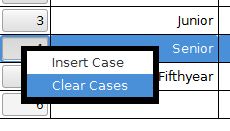
Let's say we need to insert or delete a case or a variable. Right-clicking on the case variable for a specific row will raise a pop-up menu with the option to insert or delete a case at that position. A similar feature is available for the columns.
Home | Start | Variables | Data | Descriptive | Relationship | Inferential | Effect size | Advanced | Video
This work is licensed under a Creative Commons Attribution 4.0 International License that allows sharing, adapting, and remixing.