Correlation coefficents are the most commonly done analysis for finding relationships. This will yield a score between -1.0 and +1.0, with the centerpoint of zero representing no relationship. Numbers getting farther from zero show stronger relationships, in either the positive or negative direction.
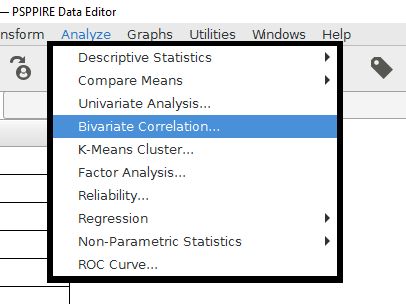
The PSPP feature for doing simple correlation coefficients is Bivariate Correlation. The prefix "bi" refers to two, so this analysis will be correlations between two variables. This command will compute Pearson's r, which is the most commonly used correlation coefficient.
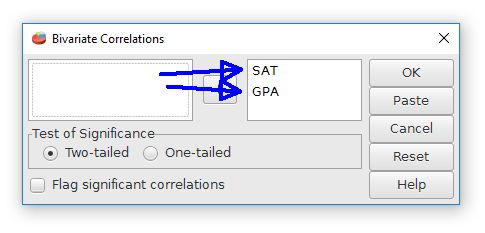
Like most analyses, we have to choose the variables that we want to correlate. Drag these variables to the open field in the center of the dialog box. It's possible to add more than two variables. PSPP will make a table that will calculate all of the possible correlations between the variables.
The "test of significance" and "flag" features are for computing the statistical significance of these variables. A two-tailed test is for open ended predictions. One-tailed is for situations with specific predictions.
The output will have a table that shows the correlation coefficients for all of the possible comparisons between the selected variables. The intersections of the rows and columns show the comparisons for the variables. Pearson r for the relationship between GPA and SAT in this example is +.78, which is strong for behavioral data. The p value is in the "Sig. (2-tailed)" row, with "sig." being short for statistical significance.
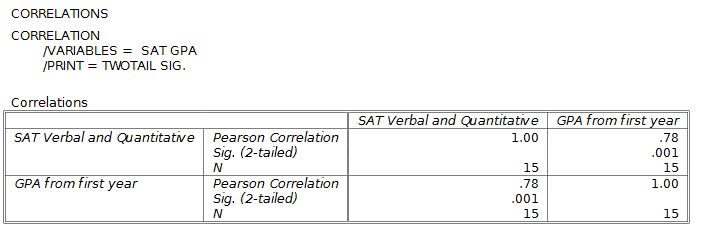
Notice that each variable has a correlation with itself of +1.0, a perfect relationship. This is not a useful result, so just ignore it.
Home | Start | Variables | Data | Descriptive | Relationship | Inferential | Effect size | Advanced | Video
This work is licensed under a Creative Commons Attribution 4.0 International License that allows sharing, adapting, and remixing.