The labels field of the variable view allows statisticans to make detailed documentation of what each variable represents. Here is the overview of our gradebook that includes the variable view. A label for the Exam1 variable is highlighted.
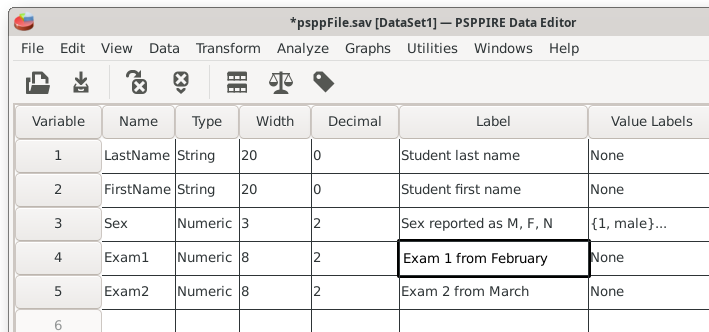
Use the label to enter a useful and detailed description of your variable. Labels serve the important purpose of documenting details. For example, a survey item entry could be "Q1: Participant Age".
The label field differs from the name field by allowing spaces and other possible special characters.
The label field could be viewed as optional. For example, the variable names of LastName and Exam1 from our grade book are pretty straightforward to understand. However, it is useful in professional research projects to thoroughly document what a complex variable represents. This can be valuable for future reference. Documentation is also useful when data files are shared between people or are made public. Other people might not understand cryptic naming conventions. The labels field is the proper place to document variable information.
Here is a profession example from a label field that was published by Pew Research: "EMPLSIT_W142. What is your current work situation?" EMPLSIT_W142 refers to the variable name. The rest is an informative description of the survey question. This example illustrates how the label field can provide much more useful information than the name field.
Home | Start | Variables | Data | Descriptive | Relationship | Inferential | Effect size | Advanced | Video
This work is licensed under a Creative Commons Attribution 4.0 International License that allows sharing, adapting, and remixing.