Starting at the left, the first field that can be edited is the "name" field. Entering text in this field will create a new variable. This is an essential step because variables must be created. This would be the minimum requirement for a new data file if other variable field settings are left at the default values.
The variables in this example have the names FirstName, LastName, Sex, Exam1, and Exam2.
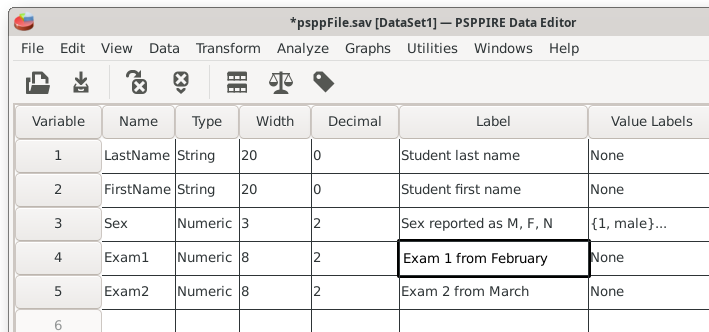
If data are pre-existing, like from an imported file, the variable names might be from the first row of the imported file. They also might be generic or default, such as Var001. These names can be edited to customize them.
Try to make the variable names informative. This will help to make the data analysis easier. Avoid uninformative names like the A, B, and C column headings used by spreadsheets.
The name field cannot handle spaces or special characters. Attempting to use these characters will result in error messages and possibly default variable names. Think of this field as requiring old-school computer programming: Strings with no special characters.
Home | Start | Variables | Data | Descriptive | Relationship | Inferential | Effect size | Advanced | Video
This work is licensed under a Creative Commons Attribution 4.0 International License that allows sharing, adapting, and remixing.