PSPP for Beginners: Miscellaneous Variable Settings
Other Variable View Settings
The right side of the variable view has a few more setting possibilities. These tend to be less important, but are still worth covering.
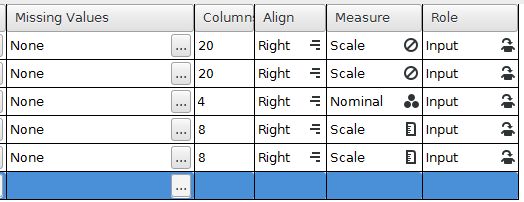
- Missing values: Settings for how missing values (empty cells) should be handled.
- Column: Set the display width of the variable in the data view. The LastName and FirstName variables have been set larger than the default of 8. In contrast, the Sex variable has been made small because it only needs to hold a single digit (1, 2, or 3).
- Alignment: Set the justification of a column to left, center, or right.
- Measurement: Set the data type to be nominal (categories), ordinal (rankings), or scale (standard measurement units). This feature was covered in the variables measure page in more detail.
- Role: The purpose of the variable. Beginning statisticians can leave this to the default "input" for data entry.
Home | Start | Variables | Data | Descriptive | Relationship | Inferential | Effect size | Advanced | Video
This work is licensed under a Creative Commons Attribution 4.0 International License that allows sharing, adapting, and remixing.