
- Posted on
- • Teaching
Free Course Calendar Tool
- Author
-
-

- User
- Gary Fisk
- Posts by this author
- Posts by this author
-
Note: This was first published on January 11, 2021.
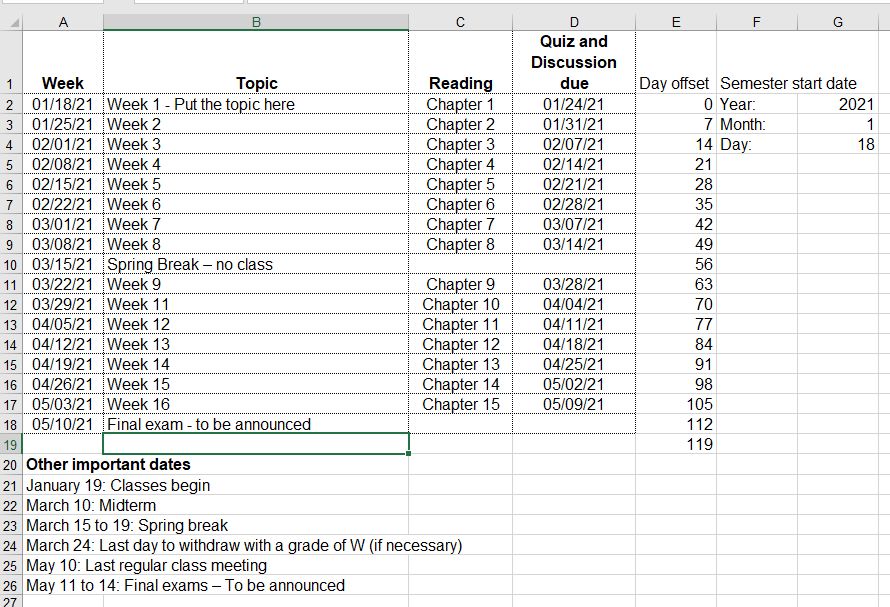
This Excel file is a course calendar tool. Just enter the starting date of the semester and all the other dates will be automagically calculated! It speeds up the development of course calendars.
Screenshot:
Instructions / tips for using the weekly calendar:
- The year, month, and day in the upper right corner are the anchor points for all calculated dates. Start by entering this information.
- The day field should start on a Monday.
- Default: The week calculations have Mondays for the start of the week.
- Default: The due calculations assume that all assignments are due on Sundays.
2. The day offset values increase each week by seven days.
- The offset values can be customized. For example, use 14 day intervals for every two weeks.
- For holiday weeks, it is easier to simply enter "spring break" (or whatever) compared to eliminating a week and fiddling with the day offset values.
3. The due date formula for Sundays is +6 from Monday (the start of the week).
- The due date can be adjusted. For example, Friday due dates could be set by using +4 rather than +6.
4. Enter the weekly topics and other special date information.
5. Create a finished calendar for students by selecting the important cells and printing the selection to a .pdf file.
Good luck with your courses!