Gary Fisk's Blog

Teaching

For teaching

  • Posted on

    Note: This was first published on July 17, 2024.

    During the pandemic I was confronted with the challenge of providing statistics software to students who had a wide range of hardware and software. Using statistics software installed on computers in the lab just wasn't an option for everyone. My solution was to code some web-based statistics calculators for basic introductory statistics needs: Descriptive statistics, t-tests, etc. These will work well even for extreme situations: on smartphones and for people who have weak internet connections.

    My web-based statistics tools for introductory statistics classes have just been updated. Z-tests, t-tests, ANOVA, and chi-squared can now provide exact p values.

    These aren't really intended to replace SPSS, R, JASP, and other professional-grade statistics software. Possible uses are classroom demonstrations or online instruction. There are also some practice pages that will give students data to work with, then provide an answer when students are ready.

    These resources are educator friendly. There are no ads, unlike some horrible online calculators. CC licensing allows for free sharing and use, making these an open education resource (OER).

    https://garyfisk.com/stats/index.html

  • Posted on

    Note: This was first published on May 13, 2024.

    Asking students to write in college courses has been a long-time educational strategy. Writing a summary shows that the assigned work has been read. Paraphrasing is to express information and ideas in our own voice, thereby putting a personal stamp on what has been read. Higher order thinking is (hopefully) accomplished via applications, analysis, and similar cognitive operations. Altogether, written assignments can be described as a write-to-learn strategy.

    New advances in generative artificial intelligence (AI) have raised questions about the value of these traditional approaches.

    Summarizing written work can now easily be done by AI systems. Student submissions are increasingly well-done, but bland AI summaries. These are often just vague overviews. A request to summarize no longer demonstrates that the student read anything. Maybe this isn't entirely new, but it seems to be an increasing problem in the last year and a half.

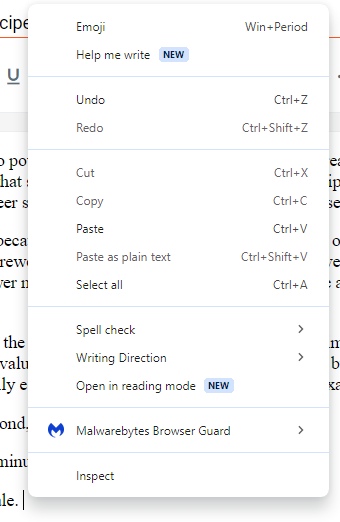
    Paraphrasing is also losing value as an educational tool. Here's two new tools that recently surpised me. Microsoft Copilot (through the Edge browser) offers "rewrite with copilot" for text pasted into a learning management system. Likewise, Google has a "help me write" option. Two screenshots are shown below. Screenshot of Google's 'help me write' command on a pop-up menu

    Screenshot of Microsoft Pilot offering to rewrite text

    This will be a mixed bag. The feedback may be helpful. The downside though is that this may be the beginning of a deskilling of writing.

  • Posted on

    The Americans with Disabilities Act (ADA) standards for online video require closed captions. Manually adding the captions is possible, but it is challenging and time-consuming. Fortunately, there are some built-in Brightspace features that make it easy to add captions. The following instructions and example are from the discussion tool feature.

    1. Getting started: Create a discussion thread. Position the cursor to the desired location for the video. Choose the "insert stuff" icon from the editor toolbar.

    2. Create the video: Chooose "add video note." Use "new recording" to make a video. If needed, allow access to your camera and microphone. Click the "next" button to accept the video and proceed to the final steps. Screenshot of the insert stuff button

    3. Add processing options: Add a title and a description. Key steps: Select the audio language from the drop-down menu and check the "automatically generate captions from audio" radio button. enter image description here

    4. Processing: Brightspace will state "The file is currently being processed." Wait until processing is finished, then preview the video. Press the "insert" button to place the video into your discussion post. Click the "post" button to make the newly created video public on the discussion board.

    5. Use: The captions can be turned on or off via the setting gear icon in the lower right corner. enter image description here

    Brightspace provides a list of languages that can be used with this feature.

    This blog post from Xavier University describes another method for existing videos: Audio/Video Note Editor from Admin tools.

  • Posted on

    Note: This was first published on January 11, 2021.

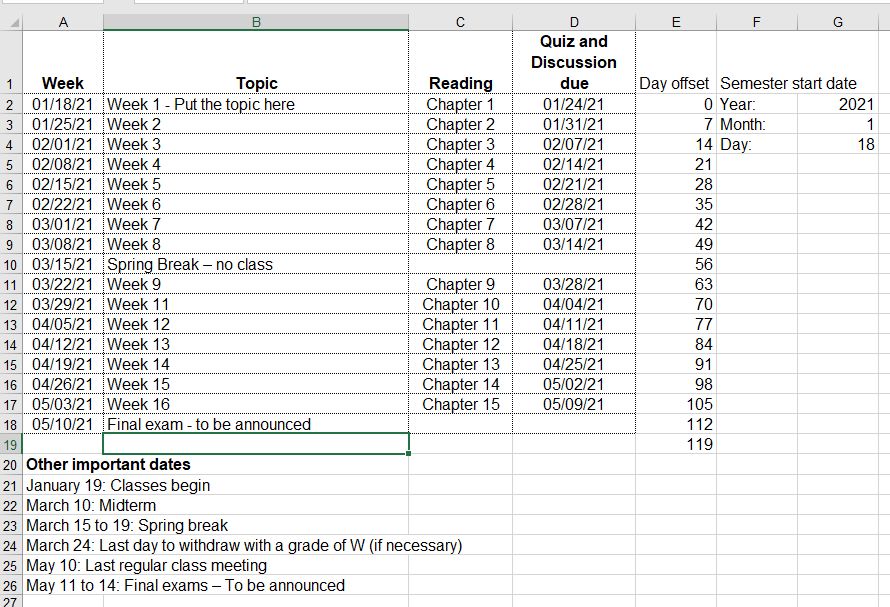
    This Excel file is a course calendar tool. Just enter the starting date of the semester and all the other dates will be automagically calculated! It speeds up the development of course calendars.

    Screenshot: enter image description here

    Download the tool.

    Instructions / tips for using the weekly calendar:

    1. The year, month, and day in the upper right corner are the anchor points for all calculated dates. Start by entering this information.

    - The day field should start on a Monday. - Default: The week calculations have Mondays for the start of the week. - Default: The due calculations assume that all assignments are due on Sundays. 2. The day offset values increase each week by seven days.
    - The offset values can be customized. For example, use 14 day intervals for every two weeks. - For holiday weeks, it is easier to simply enter "spring break" (or whatever) compared to eliminating a week and fiddling with the day offset values.
    3. The due date formula for Sundays is +6 from Monday (the start of the week).
    - The due date can be adjusted. For example, Friday due dates could be set by using +4 rather than +6. 4. Enter the weekly topics and other special date information.
    5. Create a finished calendar for students by selecting the important cells and printing the selection to a .pdf file.

    Good luck with your courses!

  • Posted on

    Note: This was originally published on January 30, 2020.

    Richard Dawkins has a great quote from Neil DeGrasse Tyson with an important insight into being a great educator. The context is that Dawkins has just given a critical presentation based upon impeccable facts. DeGrasse Tyson was concerned about the style of the presentation, so he offered the following constructive criticism.

    Being an educator is not only getting the truth right, but there's got to be an act of persuasion in there as well. Persuasion isn't always 'Here's the facts, you are either an idiot or you're not.' It's 'Here's the facts, and here is a sensitivity to your state of mind.' And it's the facts plus the sensitivity, when convolved together, creates impact. p. 262

    This combination of facts plus audience sensitivity is an excellent approach to take for every presentation.

    Source: Dawkins, R. (2015). A brief candle in the dark: My life in science. Harper Collins, New York