Gary Fisk's Blog

garyfisk

Just another HTMLy user

  • Posted on

    Note: This was first published on January 11, 2021.

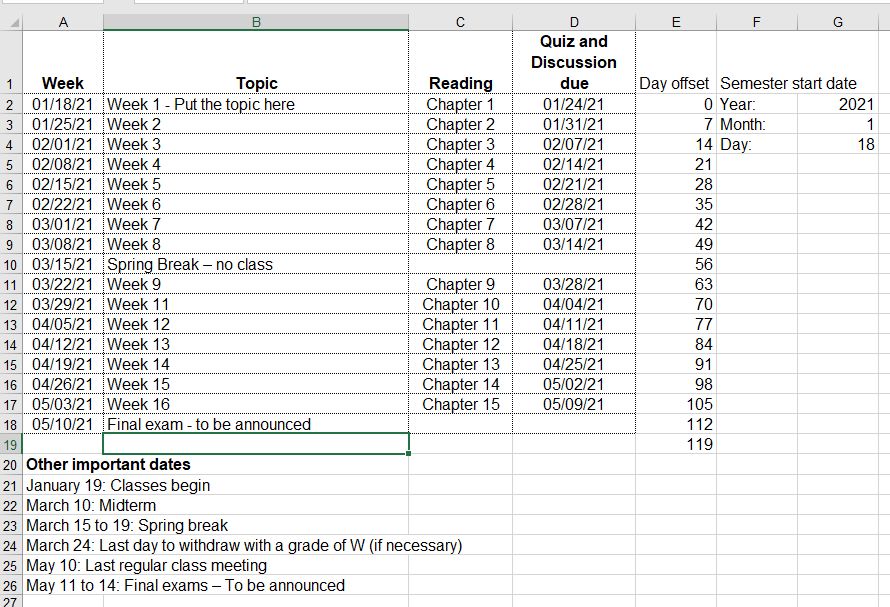
    This Excel file is a course calendar tool. Just enter the starting date of the semester and all the other dates will be automagically calculated! It speeds up the development of course calendars.

    Screenshot: enter image description here

    Download the tool.

    Instructions / tips for using the weekly calendar:

    1. The year, month, and day in the upper right corner are the anchor points for all calculated dates. Start by entering this information.

    - The day field should start on a Monday. - Default: The week calculations have Mondays for the start of the week. - Default: The due calculations assume that all assignments are due on Sundays. 2. The day offset values increase each week by seven days.
    - The offset values can be customized. For example, use 14 day intervals for every two weeks. - For holiday weeks, it is easier to simply enter "spring break" (or whatever) compared to eliminating a week and fiddling with the day offset values.
    3. The due date formula for Sundays is +6 from Monday (the start of the week).
    - The due date can be adjusted. For example, Friday due dates could be set by using +4 rather than +6. 4. Enter the weekly topics and other special date information.
    5. Create a finished calendar for students by selecting the important cells and printing the selection to a .pdf file.

    Good luck with your courses!

  • Posted on

    Note: This was first published on December 15, 2020.

    Steve Haase and I have been studying the difficult scientific topic of unconscious perceptual processing for over 20 years. Many experimental psychologists are of the opinion that perception must be largely unconscious, yet efforts to divide consciousness and isolate unconscious processing have often been inconclusive.

    A key methodological issue is how to separately measure awareness and perception. The standard approach is to use two different tasks, but using two tasks may create interpretational problems. In this work, we attempted a single-task approach. It was hypothesized that overall lexical decision response times would be sensitive to prime awareness, whereas response time differences on incongruent vs. congruent trials would provide evidence of perceptual processing. The results were mixed between the two experiments, with only the first experiment offering clear support for the single task hypothesis.

    The second hypothesis is that prime words or nonwords would produce nonassociative priming effects on lexical decisions (word vs. nonwords) for the target stimuli. In other words, trials with prime-target matches (word - WORD or nonword - NONWORD) would show facilitation. Both experiments showed strong stimulus congruency effects, thereby supporting nonassociative priming.

    After several rejections, we have decided to publish this work online without peer endorsement. The public availability of this document will promote open science and transparency. Perhaps this effort may be useful to other investigators in this field.

    The manuscript, a statement, and supporting data are available at the following web site: https://osf.io/62yf3/

    Abstract: Most studies of unconscious perception are based upon two tasks for separately assessing perception and awareness, which may create an interpretational problem. The present experiments were performed to test the possibility that lexical decision priming might show evidence of both perception and awareness in a single task. A randomly chosen word or nonword prime stimulus was briefly displayed (17 to 100 ms), then immediately followed by a randomly chosen word or nonword target for the lexical decision task (word vs. nonword discrimination). Experiment 1 nonwords had only consonant letters (no vowels – impossible nonwords), whereas Experiment 2 nonwords had consonant – vowel patterns (word-like nonwords). A response congruency effect was obtained in both experiments. Strong evidence of a processing delay caused by conscious awareness of the prime stimulus (longer overall response times) was not obtained for the long prime duration conditions. Nonassociative congruency effects may provide some methodological advantages over classical masked semantic priming, especially when the word and nonword stimuli are dissimilar.

  • Posted on

    Note: This was first published on September 25, 2020.

    Students often feel a compulsive need to write down the text from PowerPoint presentations. This is modern note-taking: a simple verbatim copy of the presented text. Their aim is to capture information that might be on future exams and store this information for future studying. The downside is that mere copying is a very passive learning approach and a distraction from what the teacher is actually saying.

    This week, I witnessed a new form of text copying that was surprising. (It was new to me, anyway.) It may be informative to people who teach with PowerPoint.

    The setting was a peer-observation of another faculty member. I was seated in the back corner of the classroom. The PowerPoint presentation had numerous key terms with complete definitions. The slide deck was available both on screen and online through the learning management system. Two students with laptop computers were seated near me with screens that could be easily seen. They had the learning management system open with the presentations loaded up. They seemed to be working hard on taking hand-written notes. So far, so good. The initial appearance was standard, college-level educational practices.

    The surprising part was that the students were actually two or three slides ahead of the presenter! They were copying information from the online PowerPoint because the amount of presented text was apparently too much to copy down in real time. Their solution was to copy text from the online presentation in advance of the actual presentation. Sadly, the spoken presentation was being ignored.

    This copying ahead of the presentation is a misguided learning strategy. It could be prevented by not providing the PowerPoint files online, but this solution misses a bigger problem. The more critical issue is that providing numerous key terms and definitions via a PowerPoint presentation is overwhelming to students. The definitions could be learned from a textbook, so there is really no need for these details in an educational presentation. Instead, educational presentations need to focus on broad ideas and instructional graphics that foster understanding instead of providing definitions.

  • Posted on

    Note: This was first published on May 7, 2020.

    The news lately has been full of statistical concepts relating to the COVID-19 virus crisis. "Flattening the curve" has become a commonly used term. Critical decisions such as reopening businesses are being based upon testing results. Here's my take on these virus-related statistics based upon my nearly 20 years of teaching introductory-level statistics classes.

    Statistics for small groups is pretty straight-forward: Test everyone and then calculate averages, make graphs, or do other summary statistics. This is called descriptive statistics. The simple goal is summarizing or describing what a group is like. An example might be a teacher summarizing the results of an exam by calculating a class average. This use of statistics is fairly simple to understand and interpret.

    A more difficult situation occurs when we study small groups of people (samples) that are drawn from much larger groups of people (populations). This is called inferential statistics. We usually study samples of people because most populations are simply too large to study. For the virus situation, it would be impossible to simultaneously test 300+ million people in the United States at the same time. Visual representation of sampling from a population

    The above diagram illustrates this inferential statistics process. The large population (left circle) represents everyone in our society who may or may not have the virus. This is too many people to test, so we must settle for testing smaller samples (right circle). The conclusions from this sample group are presumably true for the population.

    Studying samples gets around the practical problem of studying millions of people. However, the risk is that the conclusions may be inaccurate. A crucial feature is that the sample must accurately represent the population, like a miniature version of the population. In the above diagram, the population has many colors to represent the variability of people in the population. Illustration of a biased sample

    This second diagram represents a biased sample. It illustrates how a small sample might be quite different from the population that it was drawn from. The population has many colors, but the sample is only blue. Any conclusions made from this sample might be quite misleading because of the biased sample.

    We are seeing some of these sampling limitations in the current COVID-19 virus crisis. The key question is how many people have been infected? The official numbers come from small samples due to the limited availability of testing kits. Only the sickest patients are being tested in many parts of the country. There is also the issue of false negatives: people who are disease carriers yet pass a virus test without showing signs of the disease.

    Taken together, these issues suggest that the official numbers are underestimated. The true number of people who carry or die from the virus is likely higher than the official numbers. We don't really know for certain how many people have the virus in the population. It's a fuzzy picture of what's actually occurring. This statistical perspective is important to keep in mind when you see news stories about the number of people who have been infected.

    Update: July 2, 2020

    Several studies have been published since this blog post about the underestimation of cases. From Weinberger et al. (2020): "Official tallies of deaths due to COVID-19 underestimate the full increase in deaths associated with the pandemic in many states." The New York Times also has this nice summary of research from the CDC: "The number of coronavirus infections in many parts of the United States is more than 10 times higher than the reported rate, according to data released on Friday by the Centers for Disease Control and Prevention."

  • Posted on

    Note: This was first published on April 7, 2020.

    I recently had the opportunity to help seven undergraduate students prepare for a presentation at a regional conference. These people are some of our best students. Four out of the seven students had slides that looked like this: Slide with white text on a light blue background

    White text on a colored background becomes nearly invisible in our classrooms. It's washed out. Turning off all of the overhead lights doesn't help very much. There is too much ambient light coming in from the windows and an emergency overhead light that cannot be turned off.

    The slides that had black text on a light background had much better visibility. It's a better sensory combination for most classrooms.

    Slide designs and color combinations that look good on your office computer can completely fail during a presentation. The only way to be sure is to test the appearance in the classroom.

  • Posted on

    Note: This was first published on March 20, 2020. It was advice for educators who needed to rapidly move course content online during the COVID pandemic.

    There are several possibilities for adding narration and other forms of multimedia to PowerPoint presentations.

    To begin, the right hardware is needed: A microphone for capturing voice and a webcam for video. Most laptop computers have these features built-in, but some desktops may be lacking this hardware. Webcams that include microphones are inexpensive (about $30) if your computer does not have microphone or video capture capabilities.

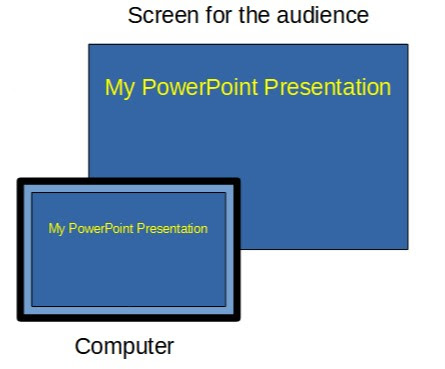
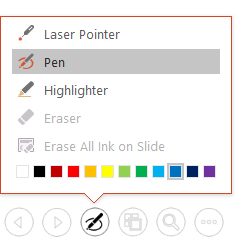
    The most basic software option would be to use the presentation recording options in PowerPoint. These can be accessed using the “record slide show” option of the “slide show” tab. When a recording is started, PowerPoint will capture narration plus slide transitions, pen annotations (control-p), and laser pointer effects (control-left mouse button). The resulting multimedia presentation can be saved as a PowerPoint file. Another option is to export the narrated PowerPoint file to video (file > export > video) for sharing.

    The recording and editing features of PowerPoint are limited. Techsmith’s Camtasia offers more powerful options for combining presentations with webcam video and audio. Similarly, OBS Studio is a free, open-source application for capturing and editing multimedia. - Camtasia - OBS Studio

    Adding audio and video to a presentation has a “wow!” factor, but there are some important downsides to consider. Multimedia requires a lot of data, resulting in large files. People with slow or unreliable internet connections could have difficulty accessing these files. If the presentation is shared as a PowerPoint file, the viewer will also need to have PowerPoint software to open the file. This can be problematic because not everyone has this software due to the expense. Finally, the creation of files with audio and video can be technically demanding and labor intensive for the presenter.

  • Posted on

    Note: This was first published on March 16, 2020.

    When moving traditional class content online, it might seem reasonable to simply upload existing PowerPoint presentations to a learning management system and call it a day. However, most PowerPoint presentations are designed to supplement a spoken presentation. The PowerPoint content of most presentations – bullet points of key terms – may not be enough for novice learners.

    One way to overcome this problem is to use the “notes” feature to write short descriptions of the essential ideas from each PowerPoint slide. The aim is to add important information that would ordinarily be spoken. The slides plus notes can then be shared with students by printing the file to a .pdf format (portable document format) for sharing on a learning management system.

    Author view: This is a PowerPoint slide with bullet points and an image.

    Print to pdf: This is the printing view showing the printer (pdf) and slides (notes pages) settings.

    Creating a pdf file for sharing with students is recommended because pdf files are easier to view than PowerPoint files. The hyperlinks to relevant information are preserved in the pdf file.

    There are other possibilities for adding the spoken component to a file that can be shared. The command “record slide show” from the “slide show” tab can capture voice with the slides, which can then be saved and shared. Software applications like Camtasia can add additional multimedia features, such as video. The downsides are that this approach is time-consuming and requires more technical expertise. It can also be problematic for students that don't have access to optimum technology.

    Good luck with your efforts to move course content online!

    I thank Ellen Cotter and Steve Haase for their helpful feedback on this idea.

    Please feel free to save or share the following files that describe this approach.

    Created: March 15, 2020 License: Creative Commons Attribution License 4.0 Gary Fisk, Ph.D., Professor of Psychology, Georgia Southwestern State University Author of Slides for Students, a book about teaching with PowerPoint

  • Posted on

    Note: This was originally published on March 5, 2020.

    Dichromatism is a form of color blindness in which one of the three cone receptor subtypes is missing or abnormal. There are three possible forms, which are protoanopia, deuteranopia, and tritanopia.

    It has been difficult for me to remember which name represents which form of dichromatism even though I have taught this topic for a long time. The names really didn't make much sense.

    Today, this mental block was resolved. Here's a way to remember these forms and their underlying issues.

    • Protoanopia: Proto means one or first, a synonym for primitive. These individuals are missing the long wavelengths, the L or "red" cones.
    • Deuteranopia: Deuter referring to second, like the word deuce. This refers to the medium wavelengths, the M or "green" cones.
    • Tritanopia: The Tri prefix means third. This represents the short wavelengths, S or "blue".

    This scheme is ordered 1, 2, and 3 for the long, medium, and short wavelengths, respectively. Problem solved!

  • Posted on

    Note: This was first published on March 5, 2020.

    Steve Haase and I recently published No Implicit-Explicit Racial Attitude Correlation in a White Sample from the rural South of the United States in the Journal of Articles in Support of the Null Hypothesis. Here's a quick overview of the paper.

    A consistent finding since the introduction of the Implicit Association Test (IAT) is that it correlates only weakly with explicit attitudes. The reason for the lack of a relationship is unclear. An early interpretation was that the near zero relationship is a sign of unconscious processing. There are other possibilities though, perhaps technical in nature.

    We hypothesized that a larger implicit-explicit correlation could be found if the explicit attitudes were more extreme. A sample of white participants was collected from the rural South of the United States, a region with a history of black prejudice. They were tested on the Modern Racism Scale (MRS; explicit attitude) and a race IAT. The MRS scores were higher than a comparable sample from Pennsylvania, but this did not lead to a strong MRS-IAT correlation. The lack of an implicit-explicit relationship does not seem to be attributable to a restriction of range effect.

    We thank Stephen Reysen (the editor) and the reviewers for being open to publishing research that does not reach the traditional criterion for statistical significance.

  • Posted on

    Note: This was originally published on February 25, 2020.

    Educators and scientists are often confronted with the challenge of information overload. Technical information is a critical part of the presentation, but the amount of information might overwhelm the audience. A solution for these situations is to walk the audience through a complex diagram with a series of on-click animations that direct audience attention to the relevant parts of the slide.

    The following example is a dark adaptation curve that illustrates how sensitivity to low light conditions increases over time. The plot shows a light energy threshold (the smallest amount of light that can be seen) as a function of time. The interpretation of the different plot components is progressively revealed to point out key features.

    Dark adaptation curve with animation to reveal key points (If you're interested in dark adaptation, here is the original PowerPoint file.)

    Some subtle features are worthy of further consideration. This slide has no additional text to interfere with or distract from the graph comprehension. Second, the graph labels are color coded to match the relevant parts of the curve and linked with the arrow. This associates the labels and the relevant parts of the curve via the Gestalt laws of similar and connectedness. Finally, the progression of reveal starts at the beginning of dark adaptation on the left, then follows the changes over time by working towards the right. This sequence follows the natural time course of dark adaptation.

    This carefully direction of attention should (hopefully!) help to make a complex technical figure more accessible to the audience.

    Source: Hecht, S., Haig, C., & Chase, A. M. (1937). The influence of light adaptation on subsequent dark adaptation of the eye. The Journal of General Physiology, 20(6), 831-850.

    License: Creative Commons Attribution 4.0 International